

How BIMI works, why it matters, and what it takes to display your brand logo in the inbox.
Table of Contents
What is BIMI?
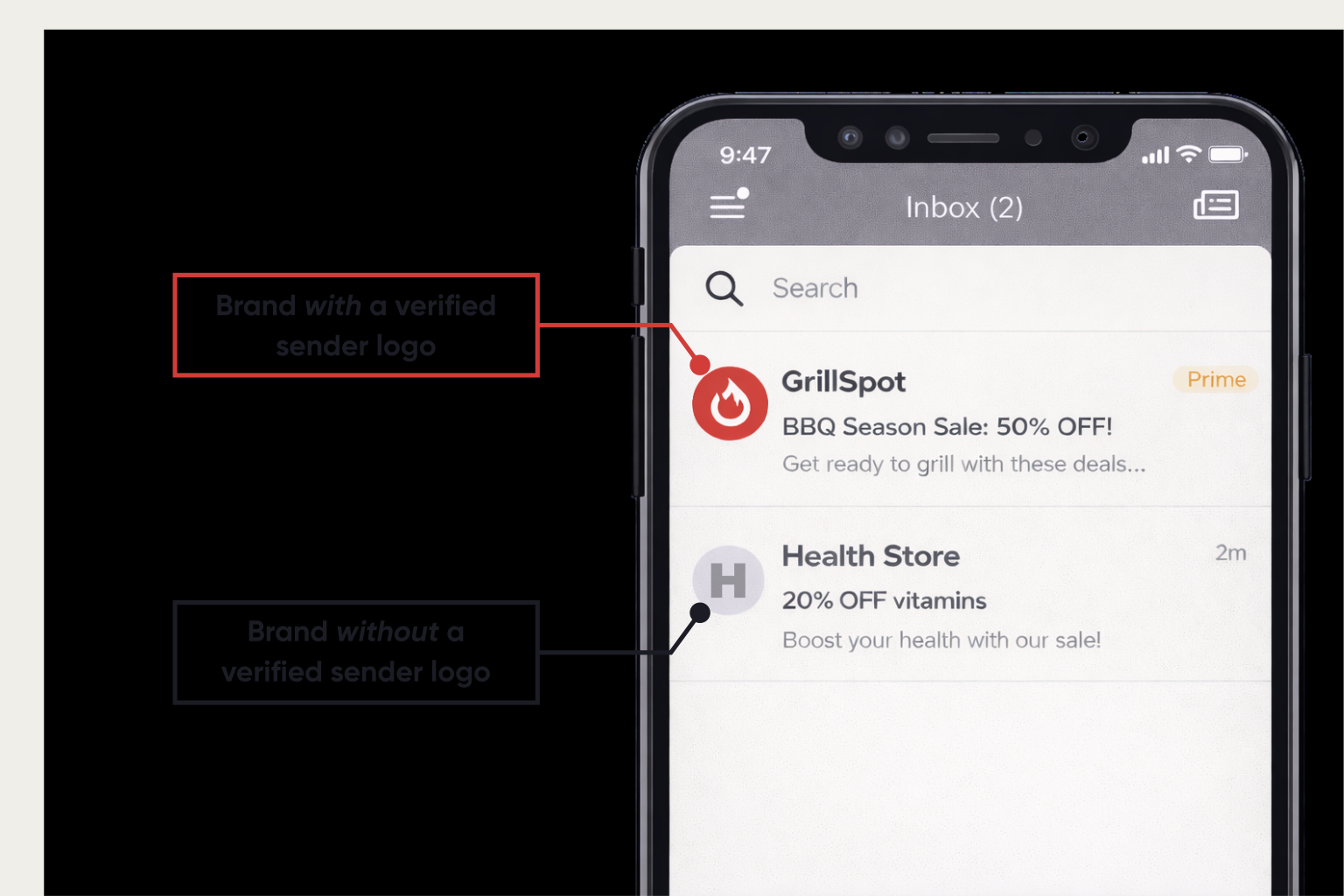
BIMI (bih-mee) stands for Brand Indicators for Message Identification. It is an email specification that allows mailbox providers to display a sender’s brand logo in the avatar spot next to the email message.
BIMI was created as part of an industry-wide effort to reduce spoofing, improve email trust, and standardize how brands are represented in inbox interfaces. That effort formally took shape in 2019, and by 2021, the first BIMI Internet Draft was published.
Since then, BIMI adoption has steadily gained momentum as more mailbox providers support it and more senders meet the requirements needed to utilize it.
Why BIMI Matters
BIMI is an interesting specification, as it is one of the rare cases where marketing goals and security goals align.
Marketers want:
- Stronger brand recognition
- More engagement
- Better inbox presence
Security teams want:
- Reduced spoofing
- Reduced phishing risk
- Stronger authentication
BIMI supports both.
Trust and Visibility in a Crowded Inbox
Email authentication has existed for years, but it’s largely been invisible to subscribers. BIMI changes that by offering recipients a visual trust cue.
Just as we associate a blue check mark on social platforms with the real deal, BIMI gives recipients a visual cue that an email is authentic—through a verified logo (and, in Gmail, a blue check mark).
This matters because the inbox is a competitive space. Even the best subject line can get lost when scrolling quickly through dozens of messages. A recognizable logo provides an immediate visual anchor, helping recipients identify and trust your message faster.
Recognition Drives Engagement
Familiarity and trust often guarantee higher open rates. When subscribers recognize your brand instantly, they are not only more likely to open your email, but also engage with the content. Avoiding unsubscribes is a plus too!
Redsift reports that brands using BIMI alongside a Mark Certificate see strong performance improvements:
- Customers are able to recognize and remember branded logos up to 44% more effectively.
- Open rates can climb as high as 39% for both promotional campaigns and transactional communications.
Raising the Bar for Email Security
One important aspect of implementing BIMI is to adopt DMARC (more on this below). BIMI requires strong authentication, which means more domains become harder to spoof.
Who Supports BIMI in 2026?
BIMI is growing, but is not yet universal.
Major support includes:
- Gmail
- Apple
- Comcast
- Fastmail
- Yahoo
Important limitation:
- Microsoft Outlook does not currently support BIMI.
See the full list here.
Not Just a Logo Feature
Now you might be thinking: “BIMI is how you add your logos to emails.”
In reality, BIMI is what happens after your email authentication is already strong.
BIMI is built on top of SPF, DKIM, and DMARC; it requires DMARC compliance, and DMARC enforces existing DKIM and SPF protocols.
The Authentication Foundation: SPF, DKIM, and DMARC
To understand BIMI and prepare for implementation, you need a basic grasp of the three major authentication standards.
SPF (Sender Policy Framework)
SPF tells mailbox providers which servers are allowed to send emails for your domain.
It is essentially answering: “Is this email coming from an authorized source?”
SPF is published as a DNS (Domain Name System) TXT record.
DKIM (DomainKeys Identified Mail)
DKIM adds a cryptographic signature to outgoing emails so inbox providers can verify that the sender is legitimate and ensure the email has not been altered.
DKIM also relies on DNS records.
DMARC (Domain-based Message Authentication, Reporting & Conformance)
DMARC protects your domain from spoofing by giving inbox providers clear instructions on how to handle emails that fail authentication. It builds on SPF and DKIM, using their results to confirm that a message is truly sent on your behalf and that the “From” address can be trusted.
What makes DMARC different is enforcement. Through a DMARC policy published in your DNS, you’re explicitly telling receiving mail servers what to do when an email fails authentication checks.
DMARC policies are defined by the p= tag and fall into three levels:
- p=none — Messages are accepted, but authentication failures are only monitored
- p=quarantine — Messages that fail authentication are treated as suspicious and sent to spam
- p=reject — Messages that fail authentication are blocked entirely
BIMI requires DMARC enforcement. A monitoring-only policy (p=none) does not qualify. Most mailbox providers require a policy of quarantine or reject before they will display BIMI logos (reject being the most favorable).

How BIMI Works (Step by Step)
Once authentication is enforced, BIMI follows a predictable flow:
1. An email is delivered
Your organization sends an email from an authenticated domain.
2. The mailbox provider validates SPF/DKIM/DMARC
The receiving inbox checks that the message passes authentication.
3. The provider looks for a BIMI DNS record
If authentication passes, the inbox queries DNS for a BIMI TXT record.
4. The BIMI record points to your logo (and mark certificate)
The record includes the location of:
- your BIMI-compliant SVG logo
- your certificate file
5. The inbox may display your verified logo
If the mailbox provider supports BIMI and chooses to display it, your logo appears in the inbox UI.
What are the Logo Requirements?
BIMI logos need to meet strict technical and security standards, which means common image formats like PNG or JPG do not work.
Most mailbox providers require logos to be:
- SVG Tiny Portable/Secure (SVG Tiny P/S) format
- Square in shape
- Small in file size (32KB or less)
- Designed with a solid background (not transparent)
- Hosted at a stable HTTPS URL
Not all SVG files are BIMI-compatible. Logos typically need to be simplified or converted to remove unsupported elements.
Because logos appear at very small sizes in inboxes, designs should focus on the core brand mark only.
Read more from Digicert here on how to prep your logo for BIMI (this is very thorough article).
What is a Mark Certificate?
A Mark Certificate is a verified digital credential that confirms your logo ownership and links it to your sending domain. Mailbox providers use it—via your BIMI record—to safely display your logo next to authenticated emails.
Verified Mark Certificates (VMCs)
Many inbox providers want proof that a logo belongs to the sender, especially Apple.
A Verified Mark Certificate (VMC) is a digital certificate that confirms:
- your organization owns the trademark for the logo
- the logo is authorized for BIMI display
VMCs are issued by certificate authorities such as DigiCert.
VMCs provide the broadest inbox support, including Apple Mail, and support Gmail’s verified checkmark experience (so the blue check mark will only appear with a VMC).
Common Mark Certificate (CMC)
Not every organization has a registered trademark.
That’s where Common Mark Certificates (CMCs) come in as a faster alternative.
A CMC does not require a trademark. Instead, it requires:
- documented public logo use over time (often 12 months)
- verification through approved sources
- confirmation that no conflicting trademark exists
CMCs are supported by Gmail and Yahoo, and they provide the same general benefits. They are known to be less expensive as well. You will not, however, get the blue check mark within Gmail.
Read more on how to obtain a Mark Certificate here.
VMC vs CMC: Which Should You Choose?
Choose a VMC if:
- you already have a registered trademark
- Apple Mail support matters
- you want Gmail’s checkmark verification
- maximum provider reach is the goal
Choose a CMC if:
- your trademark is pending or unavailable
- Gmail/Yahoo cover most of your audience
- you want lower cost and faster rollout
- you plan to upgrade later
Many companies, especially smaller ones, choose to utilize a CMC now, and opt for the VMC later. If you want more on this topic, Redsift has a great article here.
Why Your BIMI Logo Might Not Appear Immediately
It is worthwhile to note that even with a VMC, your logo may not be displayed. Mailbox providers ultimately determine this. As stated by the BIMI group: “…it’s one factor among many that contribute to your domain’s overall email reputation score.”
Mailbox providers may consider additional signals such as:
- sender reputation
- consistent email volume
- engagement rates
- spam complaints
- domain history
Any type of Mark Certificate is not immediately indicative of logo display within email clients. It is one factor in a broader trust evaluation.
Implementation Guide and Checklist
BIMI is not the swiftest process. It builds on authentication, DMARC compliance, logo validation, and more. It is essential to budget some time to get all the steps done and coordinate with the various teams needed to make it happen.
Before you begin, make sure the following pieces are in place:
🗹 DMARC enforcement
Your sending domain must have DMARC fully enforced with a policy of:
- p=quarantine or
- p=reject
A monitoring-only policy (p=none) does not qualify. DMARC alignment must apply to the domain used in the “From” address, not just a subdomain or return-path.
🗹 SPF and DKIM alignment
SPF and/or DKIM must pass and align with the From domain under DMARC rules. Ideally, most organizations should ensure both are correctly configured to avoid any potential issues.
🗹 DNS access
Your team needs the ability to create and update DNS TXT records. BIMI relies on DNS for:
- DMARC
- the BIMI record itself
- ongoing updates to logo or certificate references
If DNS is managed by a separate IT or web team, coordination is essential.
🗹 A published BIMI TXT record
You’ll need to publish a BIMI record at the correct subdomain (typically default._bimi.yourdomain.com).
This record points mailbox providers to:
- the location of your BIMI logo file
- the location of your certificate file, if required
Even small formatting errors in this record can prevent BIMI from working.
🗹 A BIMI-compliant SVG logo
Your logo must meet BIMI’s technical requirements as outlined in the above section. Many existing brand logos require adjustment or conversion before they’re usable for BIMI. The BIMI Group has SVG conversion tools that can help.
🗹 A mark certificate (highly recommended)
Depending on mailbox provider and audience, you may need a VMC or a CMC. There are pros and cons to both, as outlined above. Gmail and Apple Mail generally require certificate-based validation before displaying logos. Other providers may not, but certificate adoption is becoming more common over time.
🗹 A healthy sending reputation
Even with everything properly configured, mailbox providers ultimately decide whether to display a BIMI logo. Factors like sending consistency, engagement, complaint rates, and domain history matter and are considered.
Final Takeaways
BIMI may just be a large part of the future for all organizations. Though it has been around for over five years, it is picking up traction: trust is becoming more visible, authentication is slowly becoming expected, and brand identity is moving to inboxes.
For organizations investing in long-term email performance, BIMI is worth preparing for now.
It’s not just about appearance—it’s about proving you belong in the inbox.