Works alongside every major email and marketing automation tool
The Newsletter Builder Your ESP Forgot
Every major ESP is built to send email. None of them are built to build newsletters. Feedotter is the missing layer: two editors, built-in workflows, one-click testing, and AI agents that can assemble drafts for you.
Schedule a demo30-minute walkthrough, tailored to your content
Thousands of
companies
publishers
researchers
marketers
companies
use Feedotter to build their newsletters


Newsletter Builder,
The Missing Piece
Email platforms are excellent at sending, deliverability, list management, compliance. What they were never designed for is the actual work of building a newsletter: pulling content from multiple sources, laying it out well, getting it reviewed, and getting it right before it goes to thousands of subscribers.
That gap gets filled today with copy-paste, screenshots in Slack, and an editor rebuilding the same template by hand every week. Feedotter is the newsletter builder layer that sits on top of your ESP and closes that gap without asking you to migrate a single list.
That gap gets filled today with copy-paste, screenshots in Slack, and an editor rebuilding the same template by hand every week. Feedotter is the newsletter builder layer that sits on top of your ESP and closes that gap without asking you to migrate a single list.

Newsletter Automation You Control
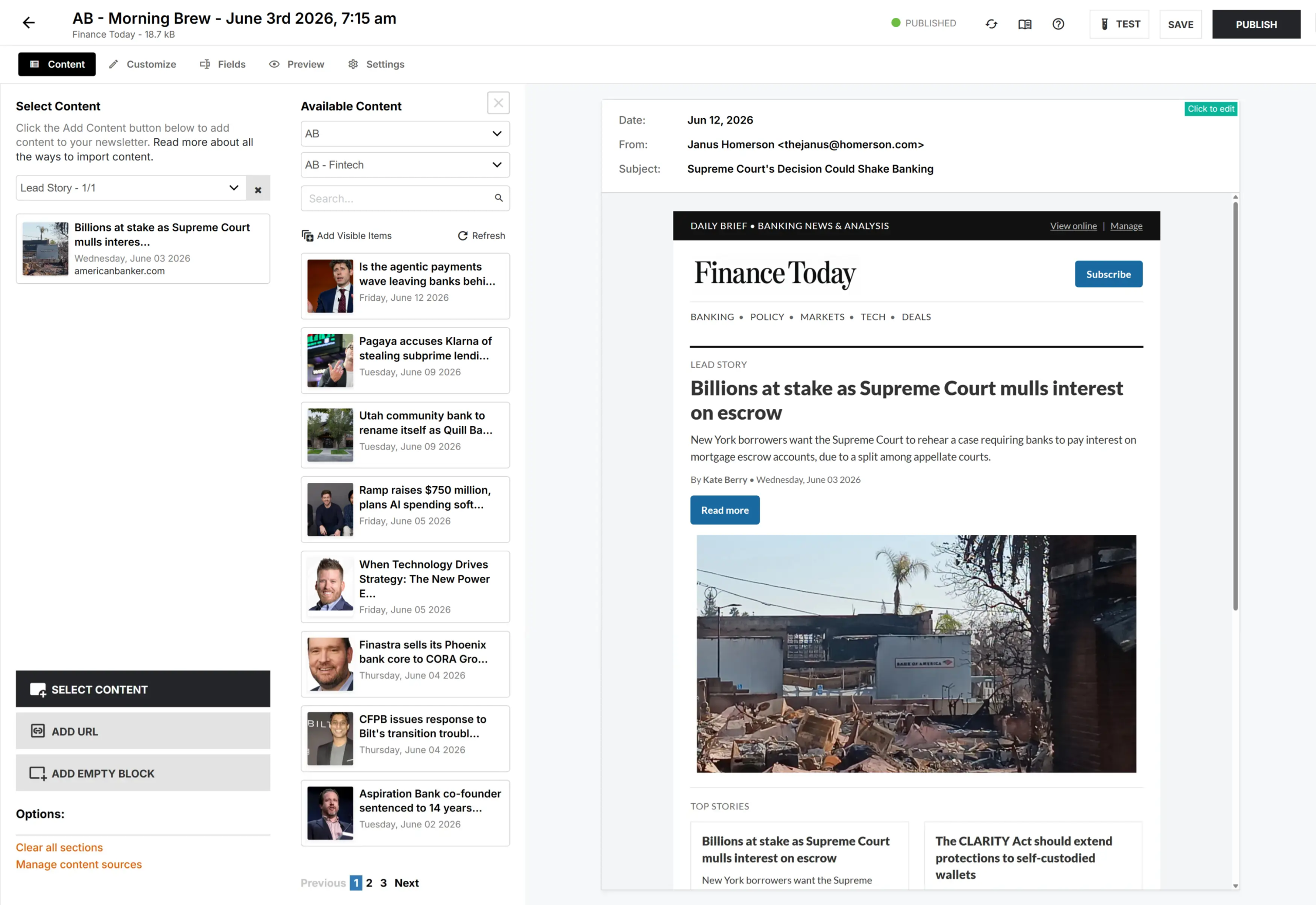
No one likes starting with a blank template. Especially if you're building a routine newsletter email. Feedotter's content agents connect to your content sources and pre-fill newsletter issues on the schedule you set. Your editor opens a draft that's already 80% built, instead of a blank template.
Automation doesn't mean hands-off. It means your team spends its time on tweaks and polish, not on repetitive assembly work they've done a hundred times before.
Automation doesn't mean hands-off. It means your team spends its time on tweaks and polish, not on repetitive assembly work they've done a hundred times before.

Newsletter Testing Tools
Confidence before send shouldn't require forwarding a rendering-broken preview around Slack. Feedotter generates a live, shareable landing page version of every issue, sends real test emails to a test list, and exports clean images of the finished newsletter for anyone who needs to review it.
Ad sales, legal, and executive stakeholders can review a polished asset without needing an account, a login, or a walkthrough.

Multiple Newsletter Editor Modes
Some newsletters are editorial, curated, crafted with a mix of articles. Some are creative written free-form like a Substack post.
Feedotter solves both newsletter challenges for your business.
Feedotter solves both newsletter challenges for your business.
CURATED EDITOR
The growth engine behind your content.
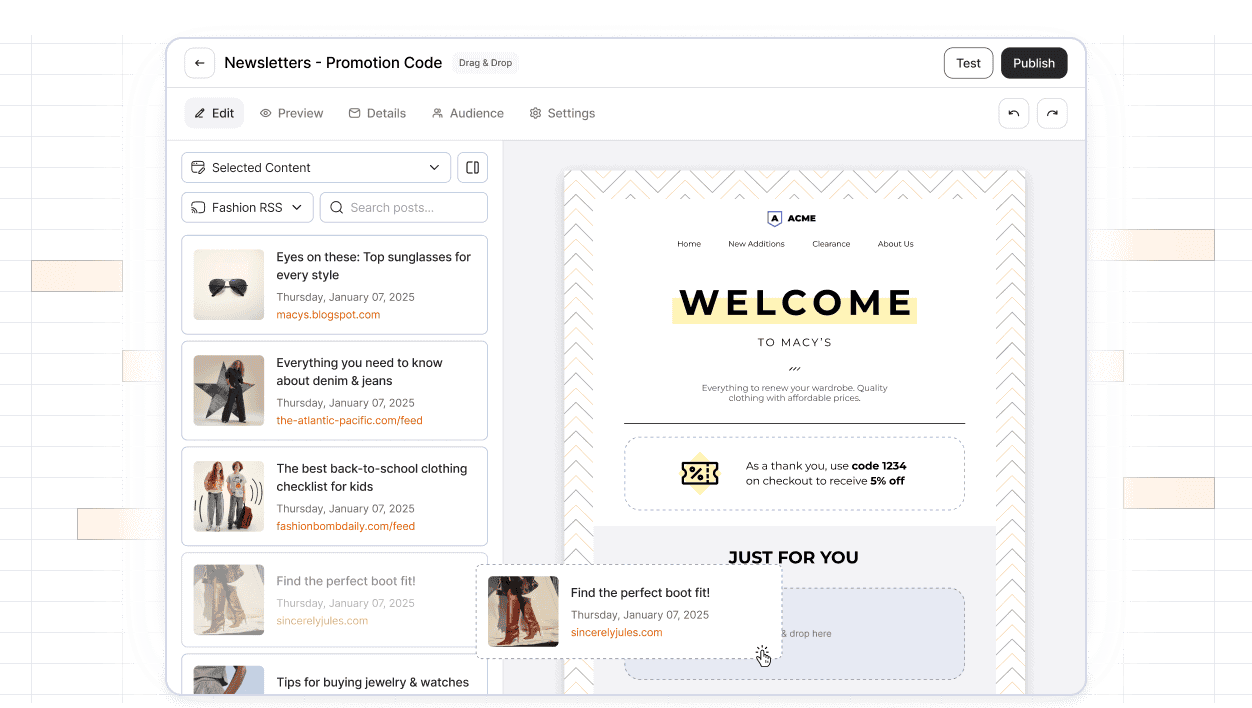
The drag-and-drop workspace for editorial teams assembling structured newsletters full of articles, ads, and sponsor slots.

SIMPLE NEWSLETTER CREATION
Clean, block-based writing
A modern, distraction-free writing surface for single-voice newsletters. Write, drop in an image, publish.
The Newsletter Builder For Your Email Software
Feedotter integrates natively with the email and marketing automation software you already use.

Live Preview
See It With Your Content
We'll take your newsletter, wire up your content source, and show you how Feedotter makes building newsletters perfect.
30-minute walkthrough, tailored to your content

What is a newsletter builder?
A newsletter builder is a dedicated tool for assembling, laying out, testing, and reviewing an email newsletter separate from the ESP that sends it. Feedotter is the newsletter builder layer that sits on top of Pardot, Marketo, HubSpot, and 30+ other platforms.
Do I need a newsletter builder if my ESP already sends newsletters?
Yes, if your team is assembling newsletters by hand today. Most ESPs handle sending, deliverability, and list management well, but they don’t provide a dedicated newsletter builder for pulling in multi-source content, laying it out, running a review step, or testing before send — which is why teams end up doing that work in Slack, Google Docs, or Photoshop instead.
Can I use Feedotter's newsletter builder with my current email service provider?
Yes. Feedotter’s newsletter builder is ESP-agnostic and integrates directly with Pardot, Marketo, Eloqua, HubSpot, Omeda, Iterable, Mailchimp, ActiveCampaign, and 30+ other platforms. You keep your existing sending setup, list management, and compliance configuration exactly as they are.
How does the content integration work? Can it pull from my CMS?
Feedotter’s newsletter builder connects to your content sources — blog, CMS, podcast feed, YouTube channel, or product update log — and automatically pulls in text and images, formatting everything to fit your template. This removes the need for manual copy-pasting between your CMS and your newsletter.
Does Feedotter offer a solution for sending emails directly?
Feedotter is built as a newsletter builder, not a sender — it hands the finished, reviewed newsletter to your existing ESP for delivery. An optional in-app sending mode is available for teams who want to manage lists and delivery from inside Feedotter directly
Is this newsletter builder suitable for enterprise-level publishing?
Yes. Feedotter’s newsletter builder is used by publishers, associations, and B2B media companies running high-volume, multi-newsletter operations, with per-newsletter permissions, approval workflows, and integrations built for teams larger than a single editor.
Does Feedotter offer a solution for sending emails directly?
Yes. While we integrate with your existing providers, we also offer an optional “In-App Newsletter Sending” feature. This flexible solution streamlines workflows by letting you manage contact lists, segments, and newsletter delivery completely inside our platform.
Is this platform suitable for enterprise-level publishing?
Absolutely. Feedotter is trusted by top publishers, B2B brands, and enterprise marketing teams. It is specifically built for organizations that need predictable, consistent, and continuously improving publishing. Our enterprise newsletter platform scales to handle high-volume recurring email content while maintaining strict brand standards.
What's the difference between Feedotter's two newsletter builder editors?
Feedotter’s newsletter builder includes two editors: the Curated Editor, a drag-and-drop tool for multi-column digests with ads and sponsor slots, and the Modern Editor, a clean block-based writing surface similar to Substack or Beehiiv for single-voice newsletters. Both publish through the same review workflow and send through your existing ESP.
Can I customize the design of newsletters built in Feedotter?
Yes. Feedotter’s newsletter builder supports unlimited templates with full control over columns, fonts, colors, and spacing, so you can run a different design for every newsletter or audience segment without touching code.
What kind of analytics and reporting does Feedotter provide?
We provide a unified newsletter dashboard that gives you a single-pane view of the data you need. You can track subscriber trends and assess performance metrics for your sends in real-time. This comprehensive dashboard supports accelerated data analysis and provides key insights to help you optimize performance.
Is Feedotter difficult to set up or learn?
Not at all. Ease of use and setup is a major priority for us. Customers report that Feedotter “just works” and allows them to take ideas from editorial to reality without back-and-forth. By automating the manual rebuilding of newsletters, teams see production times positively impacted almost immediately.
How does Feedotter ensure brand consistency at scale?
Scaling newsletters often leads to errors in assembly and inconsistencies. Feedotter solves this by using defined templates where you simply choose your layout preferences. This ensures that whether you send one newsletter or one hundred, your designs are attractive, consistent, and error-free across all channels and audiences.
Give your editors the newsletter builder they deserve.
Schedule a demo