RSS Email Automation Build for the Enterprise
Most email platforms treat RSS-to-email as an afterthought — or skip it entirely. Feedotter replaces that gap with automatic image handling, unlimited design control, cross-team governance, and per-article analytics, built on ten years of enterprise deployments. Works with the ESP you already run.


Why You Need An Enterprise RSS Email Solution
Native RSS Email (Any ESP)
Feedotter RSS Email
Pull Every Content Source Into a Single RSS Email
With Feedotter, connect as many RSS feeds as you need. Feedotter monitors all of them simultaneously, deduplicates content across sources, and assembles everything into a single, polished email — sent on whatever schedule you choose.
- Connect blog, podcast, video, and news RSS feeds in one campaign
- Automatic deduplication — among feeds and sends
- Set minimum content thresholds before a send triggers

An RSS Email Dashboard Built for Enterprise Teams
Pause a campaign before a product launch. Restart it when you're ready. Adjust send schedules without rebuilding from scratch.
- Unified view of all active RSS email campaigns
- One-click pause, resume, and schedule adjustments
- Full delivery history with audit log, and email screenshots
- Role-based access — share visibility without sharing ESP credentials

Perfect Images in Every RSS Email — Automatically
Feedotter's image engine crawls each RSS item, identifies the best available image, validates it, and reformats it to match your template's exact size requirements.
- Auto-discovers featured images from any RSS source
- Smart resize and crop — no distortion, no letterboxing
- Configurable fallback images per feed or campaign
- Converts WebP, AVIF images into email-safe PNGs

Unlimited Layout Control for Your RSS Emails
Feedotter works differently. You supply your own custom HTML template, and Feedotter populates it with your RSS content in whatever layout you design — single-column digests, magazine-style grids, featured-article-plus-thumbnails, anything your brand requires. Full flexibility of HTML and CSS, styled exactly the way you want.
- Multi-column and grid layouts with full styling control
- Full CSS styling control, not a fixed set of builder blocks
- Mix content types in one template: featured story + digest + shorts
- Far beyond the plain, unstylable link lists native RSS tools produce

Filter Your RSS Items With Precision Content Rules
- Filter by category, author, date range, or keyword — right in the feed editor
- Keyword filtering searches both the title and the post copy
- No need to create a separate RSS feed for every audience or segment
- Preview the filtered result before activating a campaign

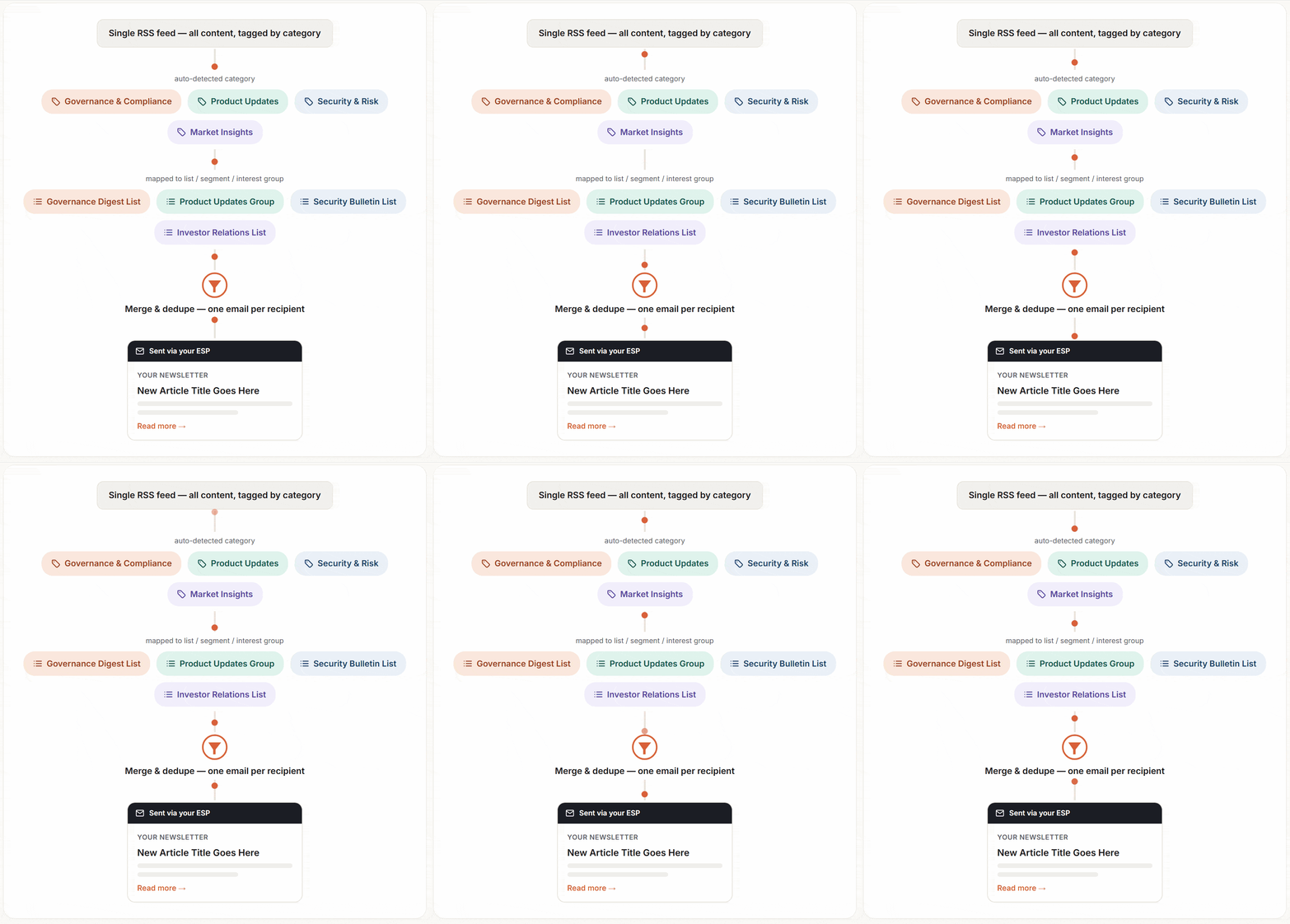
Route RSS Emails to Segments, Lists, and Interests
- One RSS feed, auto-routed by category to the right lists, segments, or interest groups
- Map categories to groups once — every new post matches automatically after that
- Automatic deduplication — recipients in multiple groups still get just one email
- Run unlimited simultaneous campaigns for different audiences
Full UTM Tracking and Per-Article Analytics for RSS emails
- Auto-generated UTM parameters on every RSS link
- Per-article click tracking and engagement scoring
- Full send history with content-level reporting
- Exportable reports compatible with HubSpot custom dashboards

Publish Your RSS Emails Through Any ESP or Marketing Automation Platform


Enterprise RSS Email — Questions We Hear All the Time
Does my email platform have built-in RSS-to-email functionality?
Most major ESPs offer some form of RSS email, but it’s typically a secondary feature: broken image handling, one feed per campaign, no filtering, and little reporting. Feedotter adds enterprise-grade image handling, multi-feed merging, governance, and analytics on top of the ESP you already use.
What email software does Feedotter work with?
Feedotter is ESP-agnostic and integrates with enterprise email software out of the box. HubSpot, Salesforce Marketing Cloud, Marketing Cloud Next, Pardot/SAE, Marketo, Eloqua, Iterable, Mailchimp, ActiveCampaign, Omeda, and others.
Can Feedotter support multiple brands, business units, or teams on different ESPs?
Yes — Feedotter centralizes RSS email management and content governance even when different teams send through different platforms.
Do we need to migrate ESPs to use Feedotter?
No. Feedotter layers on top of your existing ESP and sends through your existing infrastructure — there’s no migration.
What happens to our RSS email program if we switch ESPs later?
Because Feedotter isn’t tied to one platform’s native RSS tool, your feeds, filtering rules, and templates carry over — you’re not rebuilding the program from scratch.
What about connecting RSS to my ESP with Zapier or a similar workflow tool?
Workflow connectors like Zapier just move raw feed data — they don’t solve any of the actual RSS email problems. Images still come through broken or missing. The connection is fragile and prone to silently failing, and because it lives off on its own outside your ESP and your team’s visibility, nobody notices until subscribers stop getting content. It’s a duct-tape integration, not a long-term solution. Feedotter is purpose-built for RSS-to-email: image handling, layout, deduplication, filtering, and analytics, natively connected to your ESP.
Is Feedotter secure enough for enterprise requirements?
Yes — Feedotter is SOC 2 compliant, so your RSS email program meets the security bar enterprise procurement and IT teams expect.
See Your RSS Emails In Action